Unusable Engineering ApS
effect

Frequency Guillotine

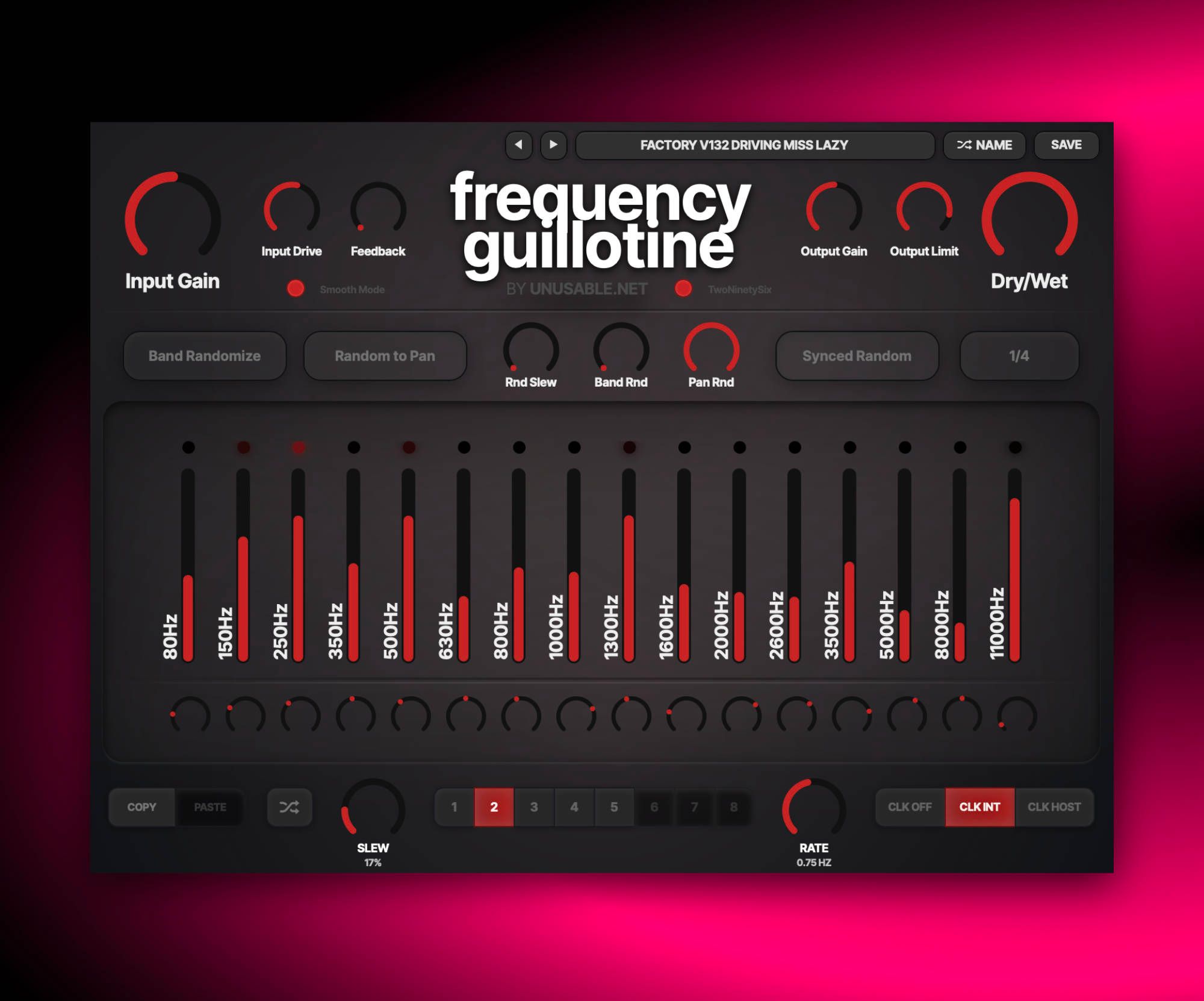
A 16-band spectral slicer for vocoder-style shaping, stereo motion, and rhythmic spectral manipulation.

FilterbankAU/VST3Mac/Win

New Smooth Mode

  • Added an alternate, softer processing mode.
  • Uses a smoother asymmetric input-drive algorithm with less high-frequency bite.
  • Applies tape-style saturation and drive-dependent damping to individual bands.
  • Uses 36 dB/octave filtering instead of 48 dB/octave.
  • Changes the lowest band to low-pass and the highest band to high-pass.
  • Reduces the effective positive band boost from +24 dB to +18 dB while retaining the full control travel.
  • Uses a valve-style output limiter.

Slot Sequencer

  • Parameters held during sequencing now overwrite every slot passed during the gesture without jumping at slot changes.
  • Added Cmd/Ctrl+click slot preview, which pauses sequencing and auditions the selected slot without slew.
  • Added Shift+drag for moving all band levels or all pan controls together.

Shortcuts And History

  • Added slot copy and paste with Cmd/Ctrl+C and Cmd/Ctrl+V.
  • Added multi-step undo with Cmd/Ctrl+Z.
  • Added redo with Cmd/Ctrl+Shift+Z.

Interface Stability

  • Reduced unnecessary WebView lookups and redraw work during sequencer slew animation.
  • Fixed occasional control freezes, jumps, and interrupted gestures while the sequencer is running.

What it is

Frequency Guillotine is a 16-band stereo filterbank effect designed for creative spectral effects. It sits between a creative EQ, a vocoder-like shaper, and a performance modulation tool.

Each band has dedicated level and pan control, and the input path can be driven before the bank to add extra bite. Randomization with controllable range and slew gives repeatable movement rather than pure randomness. Sidechain interaction can push it toward speech-like or formant-like motion when needed.

Use it to open holes in dense synth buses, build rhythmic stereo animation on static material, or push into controlled destruction for transitions and drops. It can be subtle, but most of the time you want it to shine.

Highlights

16-band resonator architecture

Steep, narrow bands for deliberate spectral placement and tonal slicing.

Clocked chaos engine

Randomization with sync and slew creates movement that stays musical.

Destruction-ready signal path

Input drive, feedback behavior, and output limiting support aggressive workflows.

Full walkthrough

A quick 3-minute walkthrough of Frequency Guillotine covering its different functionality, especially the randomization options, and showing it with different input sources.

Slot sequencer

On Frequency Guillotine, the slot sequencer is not only about groove, but also about changing the spectral identity of the sound over time. Different slots can hold very different band balances, pan distributions, and randomization states, so the plugin can move from narrow and focused to wide, hollow, brittle, or aggressively carved without manual redrawing.

Using just two or three active slots is often enough to make a source feel like it is passing through different filterbank personalities. At slower slew settings it becomes a smooth timbral morph, and at faster rates it can create stepped spectral movement that no ordinary EQ would ever arrive at.

Watch slot sequencer video
Reference

Quick user guide

Frequency Guillotine sums the input to mono, divides it into 16 bands, and places every band independently in the stereo output. This guide covers the signal path, frequency modes, sidechain behavior, randomization, slot sequencing, presets, and editing gestures.

01

Signal path and modes
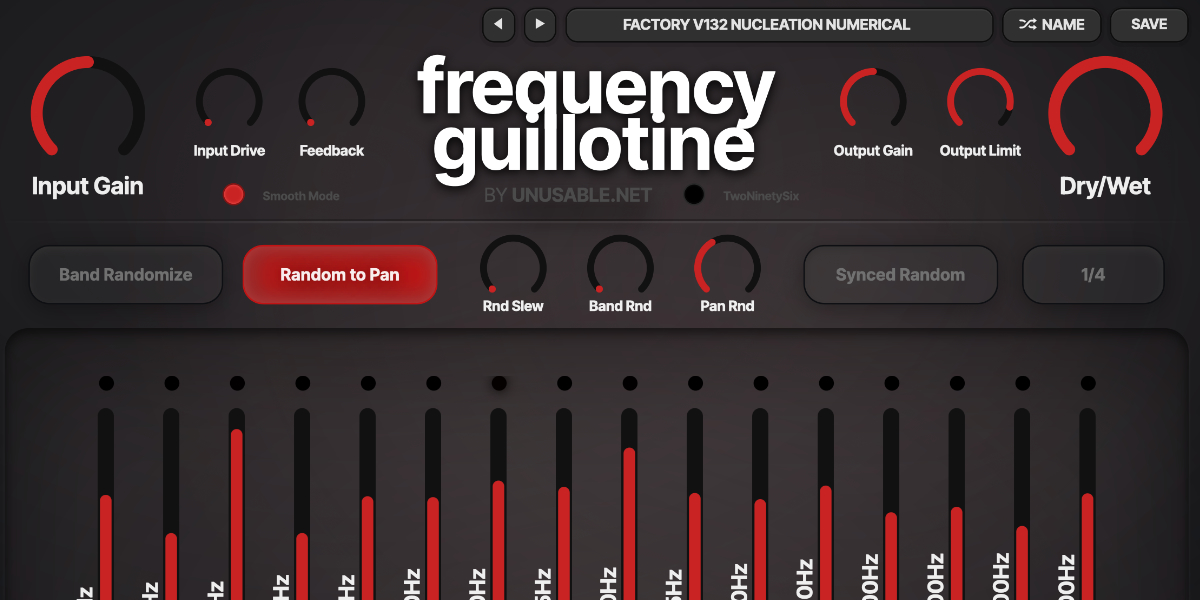
Frequency Guillotine input, mode, output, and mix controls

The mono input passes through gain and drive, enters the parallel filterbank, and is rebuilt as stereo from the 16 level and pan settings. Output gain, limiting, and the Dry/Wet mix follow the bank.

Input Gain sets level before saturation and the filterbank.

Input Drive increases input saturation before the signal is split into bands.

Feedback returns the summed filterbank output to the mono input. Higher values increase resonance, density, and the chance of self-sustaining tones.

Output Gain sets level after the filterbank.

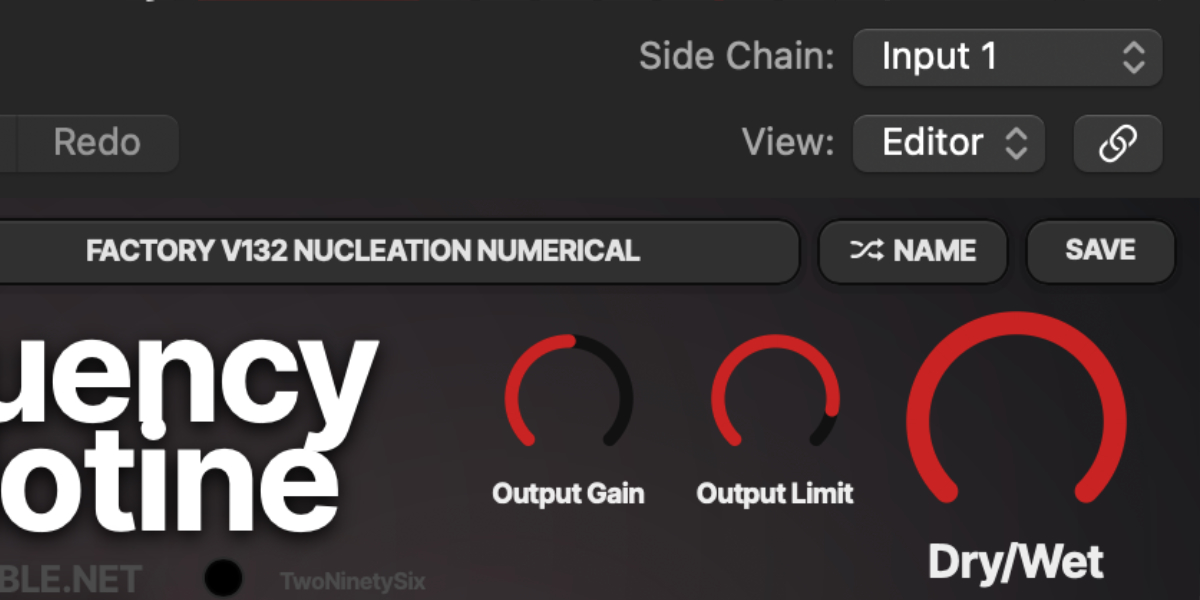
Output Limit sets the threshold of the final soft limiter.

Dry/Wet crossfades between the unprocessed input and the stereo filterbank output.

TwoNinetySix switches both the audio and sidechain banks to centers at 80, 150, 250, 350, 500, 630, 800, 1000, 1300, 1600, 2000, 2600, 3500, 5000, 8000, and 11000 Hz.

Smooth Mode changes the saturation and limiting curves, reduces the filter slopes from 48 to 36 dB/octave, uses the lowest and highest bands as low-pass and high-pass filters, and maps the positive band range to a softer maximum of +18 dB.
02

Filterbank levels and pan

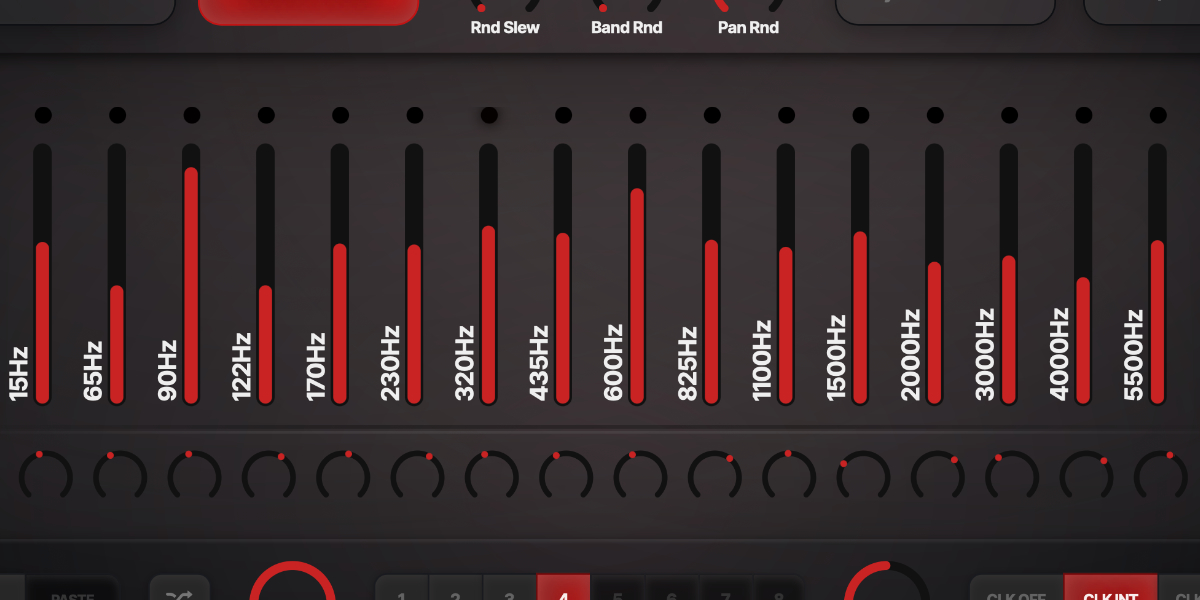
Sixteen Frequency Guillotine level faders, meters, frequency labels, and pan controls

Each vertical fader controls one filterband from -72 to +24 dB in normal mode. The small rotary control below it places that band in the stereo field using constant-power panning.

Band faders attenuate or boost the output of each band. The printed labels show the active center frequencies.

Pan controls place each band from left through center to right.

Band dots show signal level for each band. Black means no signal, red indicates the normal range, and pale red indicates overload.

The normal frequency set is 15, 65, 90, 122, 170, 230, 320, 435, 600, 825, 1100, 1500, 2000, 3000, 4000, and 5500 Hz.

Option/Alt-drag across the band area
Draw band levels directly across multiple faders. The gesture can begin between faders.
Shift-drag a level or pan
Move all 16 controls of that type by the same relative amount while preserving their shape as far as the limits allow.
Drag while slots advance
Write the held parameter into each incoming slot without interrupting unrelated band or pan movement.
03

Automatic sidechain vocoder

Frequency Guillotine band controls used by automatic sidechain vocoder mode

When a real sidechain signal is present, Frequency Guillotine automatically changes from its static filterbank response to a 16-band vocoder. The main input remains the carrier and the matching sidechain bands become control envelopes.

No sidechain signal uses the regular filterbank mode. A sidechain that is only a host-created mirror of the main input is treated as inactive.

Once a real sidechain has been detected during playback, vocoder mode remains latched through silent passages until transport stops.

Band faders attenuate or boost the corresponding sidechain-controlled carrier band instead of being replaced by the envelope value.

Pan controls still place the vocoder bands independently in stereo.

Dry/Wet continues to mix the original carrier with the vocoded output.

TwoNinetySix and Smooth Mode affect the main and sidechain filterbanks together, so corresponding bands remain aligned.

04

Band randomization

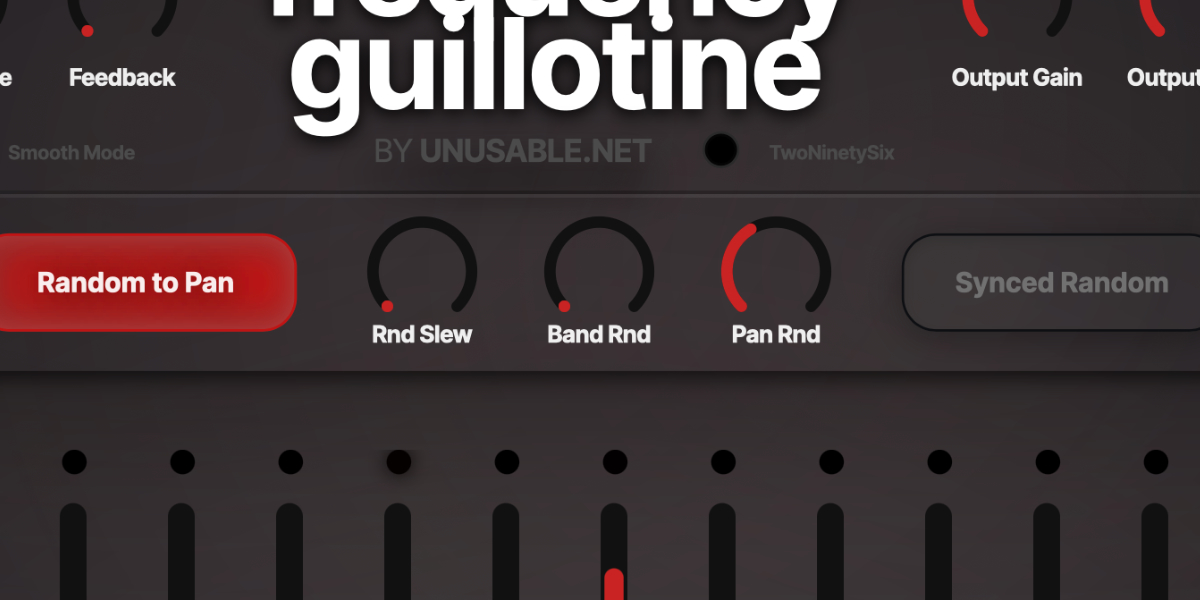
Frequency Guillotine manual and synchronized randomization controls

Manual and clocked randomization create new band-level targets. Range limits the distance from the current state, and Slew determines how long the controls and audio take to reach each target.

Band Randomize generates one new set of band levels. It works with Slew even when synced randomization and the slot clock are off.

Random to Pan includes the 16 pan controls when a random event is generated.

Band Rnd sets level-randomization range. Zero produces no movement; maximum can use the full available range around 0 dB.

Pan Rnd sets pan-randomization range. Zero leaves pan unchanged.

Rnd Slew sets transition time. Without synced random it runs from 0.01 to 18 seconds; with sync active it runs from immediate to the full selected note length.

Synced Random generates a new target from the DAW clock.

Sync Div sets the clock interval from 1/32 through dotted and triplet values to 8 bars.

Generated values affect the sound and slots but are not written as host automation. Only direct user gestures write automation.

05

Slots and slot editing

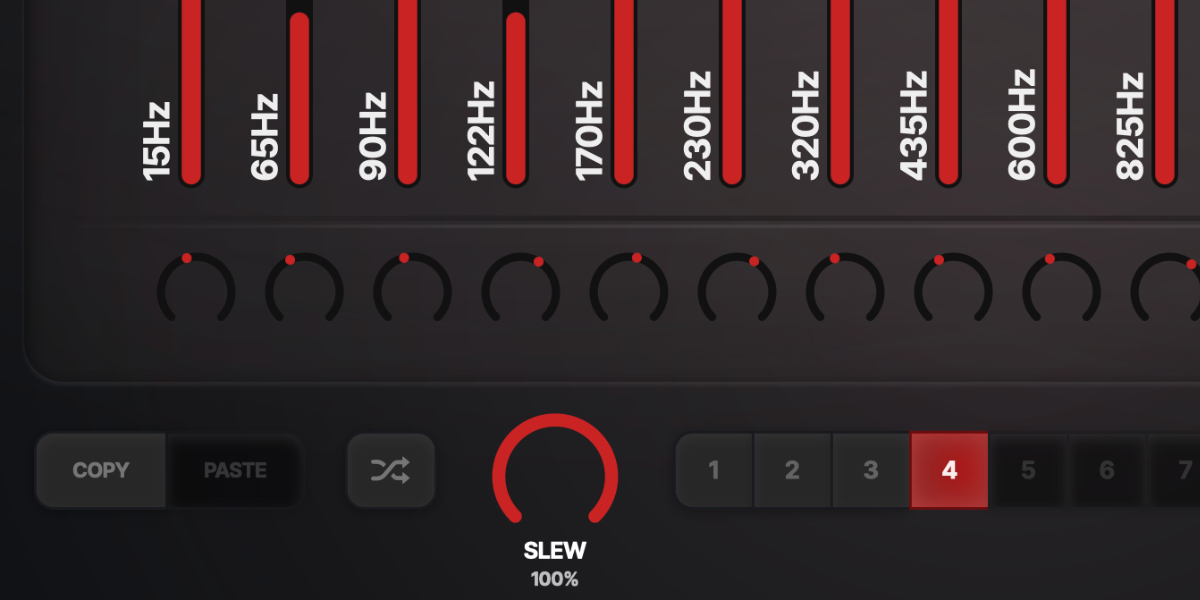
Frequency Guillotine slot copy, paste, random, and eight slot buttons

Eight slots store independent sets of all 16 band levels and pans. Selecting a slot recalls it for editing; sequencing moves between the enabled slot states.

1-8 select a slot and show its stored band and pan values.

Copy / Paste copies or pastes the complete level-and-pan state of the selected slot.

Random creates randomized level and pan content for the slot pattern.

Manual Band Randomize and synced randomization update slot contents as well as the current audible targets.

A held level, pan, or supported button is a persistent gesture override. Every slot passed during the gesture receives only that edited parameter; all other lanes continue their own slew.

Shift-click or double-click slot
Enable or disable that slot for sequencing.
Cmd/Ctrl-click slot
Preview that slot, stop sequencer movement, slew to its state, and show a white inset outline.
Cmd/Ctrl+C / Cmd/Ctrl+V
Copy or paste the selected slot.
Cmd/Ctrl+Z
Undo the previous edit gesture.
Cmd/Ctrl+Shift+Z
Redo an undone gesture unless a new edit has cleared the redo history.
06

Slot sequencer

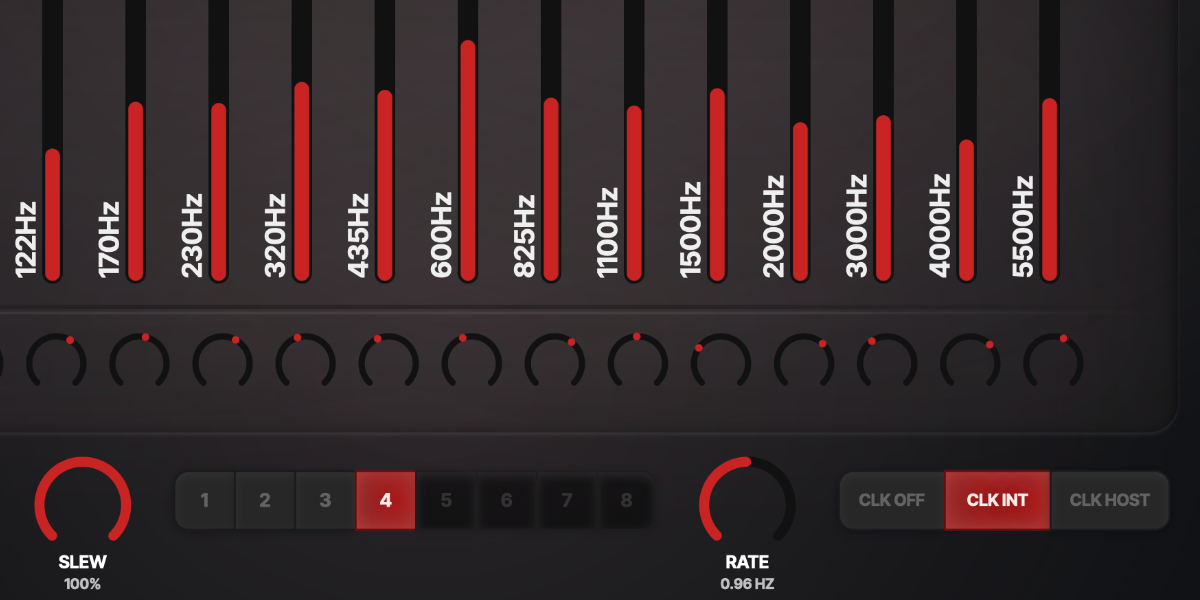
Frequency Guillotine slot slew, rate, and clock-source controls

The sequencer advances through enabled slots and interpolates every band level and pan independently. Clock source, Rate, and Slew determine when a new target is selected and how it is reached.

CLK OFF stops automatic stepping. Slots can still be selected manually, and randomization still uses its own slew.

CLK INT runs from the internal clock. Rate is displayed in Hz and uses an exponential response for useful control at slower speeds.

CLK HOST runs from the DAW transport and changes Rate to musical divisions.

Rate sets internal speed or host-clock division, depending on the selected clock source.

Slew sets interpolation between slot states. At 100% the transition occupies the complete step and reaches the incoming slot exactly at the next boundary.

A short minimum transition is retained at the lowest setting to reduce clicks when slot values change abruptly.

Slot selection, Slew, internal Rate, and host Sync Division are exposed as automatable parameters.

07

Presets and control shortcuts

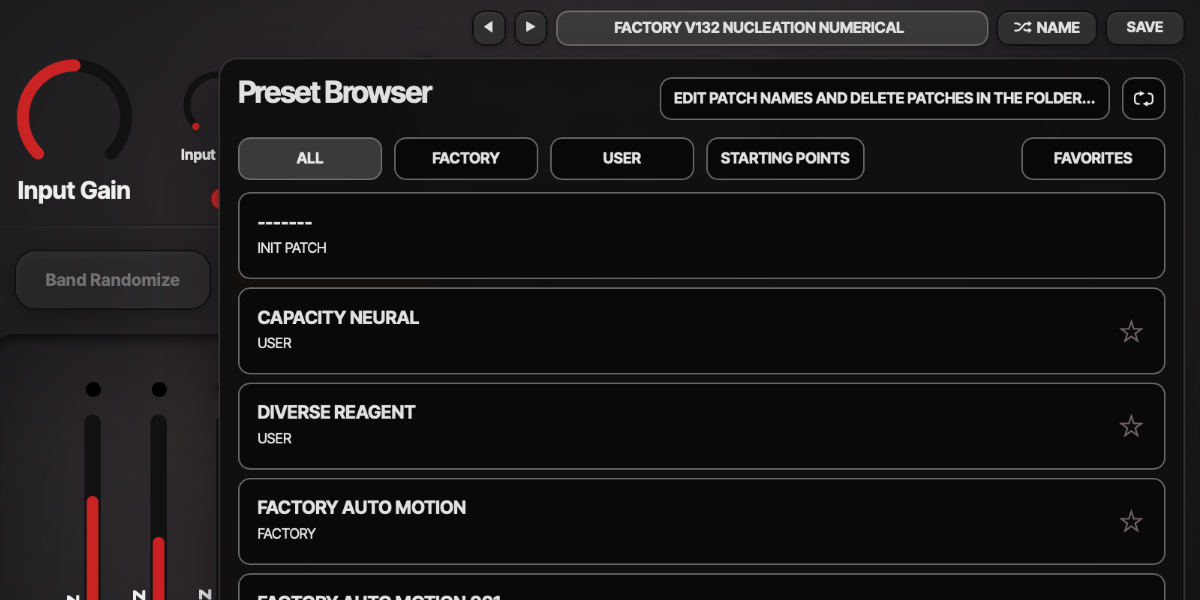
Frequency Guillotine preset arrows, name display, random name, and save buttons

The name display opens the preset browser. Presets store the complete plug-in state, including all eight slots and sequencer settings.

Preset arrows step through the available presets and wrap between the first and last entries.

Preset name opens the preset browser.

Name generates a preset name.

Save writes the complete state. Saving without first generating a name creates one automatically.

Factory / User / Starting Points / Favorites filter the preset browser.

Versioned Save writes a numbered copy when the current preset has changed.

Folder opens the preset directory for external renaming or deletion.

Refresh reloads externally renamed or deleted preset files.

Double-click control
Reset it to the initial value.
Cmd/Ctrl-click or Option/Alt-click control
Reset it to the initial value.
Wheel over control
Adjust without dragging.
Option/Alt-wheel
Fine adjustment.
Shift-wheel
Coarse adjustment.

Recommended for

  • Rhythmic filter movement on sustained synth pads
  • Stereo widening and energy placement by spectral band
  • Creative formant-style shaping with sidechain control

Fit and focus

Great fit for:

  • modular filterbanks and vocoder-style effects
  • evolving sonic landscapes and drones
  • tempo-synced controlled unpredictability

Questions people ask

What is Frequency Guillotine?

It is a 16-band spectral slicer plugin that lets you shape level and stereo position per band, with slot sequencing and optional random and sidechain-driven motion.

How is it different from a normal EQ?

A normal EQ is mainly corrective or static. Frequency Guillotine is built for active spectral movement and evoling sonic landscapes.

Who is it for?

It is built to be an integral part of your a channel strip. Ideally it should be played together with the instrument it is processing. So it is for musicians that want to play together with the effect.

What does it do to sound?

It can sharpen or hollow out specific spectral zones, generate resonant bodies, create moving timbral patterns, and push material from focused to aggressively fragmented.

Compatibility

macOS 12+, Windows 10/11
macOS: AU/VST3, Windows: VST3

These plugins use detailed real-time processing and are happiest on reasonably recent CPUs, especially when several instances are running at once.

Slot sequencer

A shared walkthrough of the Unusable slot sequencer system, including how stored states, stepping, and slew can turn a static patch into motion.

Preset system

A shared walkthrough of the Unusable preset system, with practical tips for saving, naming, organizing, and moving between ideas.

Bundle option

Also available in bundle form

If this plugin fits your workflow, there is a good chance one of the bundles will fit even better and reduce total spend.

Emulated Effects Pack

Six circuit-inspired effects for fuzz, modulation, filtering, spring space, and controlled digital decay.

€79.00€174.00incl. 25% VAT

Includes 6 products.

Full Suite v2

All unusable tools in one package, built to surprise, inspire, and keep the creative process moving.

€179.00€496.00incl. 25% VAT

Includes 16 products.